Runway Dev lands in Claude Code, Codex and Cursor
On November 2, Runway shipped a free plugin that connects Claude Code, Codex and Cursor to its video API. What it does, what it doesn't, and who it's for.

Contents · 7 sections
Ever tried wiring a video API into a small in-house tool? You lose an evening in the docs, you get a model name wrong, you find out the real price after the first render, and the API key ends up pasted into a file you shouldn't have shared. Runway wants to kill that evening.
On November 2, 2026, Runway released Runway Dev plugins for three coding agents: Anthropic's Claude Code, OpenAI's Codex and Cursor. Once installed, your agent reads your Runway Dev account (your projects, the models each project is allowed to use, their prices, your credit balance) and can build the integration for you. I went through the official announcement and docs on November 5. Here's what's true, what's overstated elsewhere, and what it changes if you make video.
What Runway launched on November 2
The announcement fits in one line on Runway's blog: "Today, we're launching Runway Dev plugins for Claude Code, Codex and Cursor." The plugin is called runway-api. It combines two pieces:
- the Runway Dev MCP, the connector Runway opened on September 2 so an assistant can read an account;
- seven skills, instruction files that teach the agent how to use the API: setup, model choice, Model Routers, Characters, Recipes, Workflows.
In practice, the agent can list your projects, see which models each one allows along with price and limits, check your credit balance, then create a Model Router (a switch that picks the model based on the request), a Character (a real-time avatar), a Recipe, or hook up a Workflow published from the Runway app. When a call fails, it reads the error details. When a Model Router picks a model, it can see why.
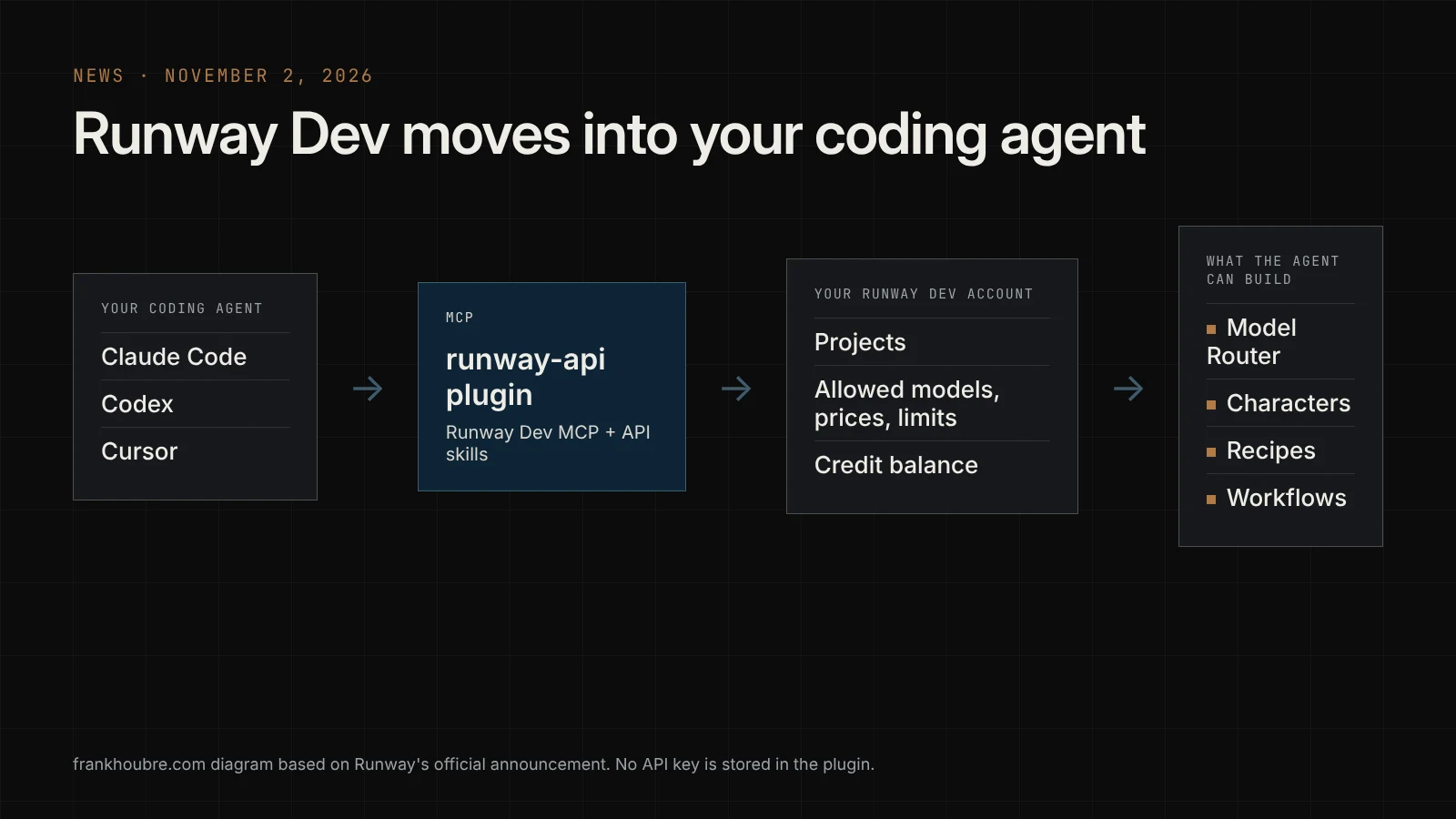
Runway's own example says it well: you describe the feature you want, "a product video for every item in your store", and the agent builds it end to end without leaving the editor.
What other sites got wrong: the plugin generates nothing
I've seen roundups describe the plugin as a video generator in your terminal, with tool names like "generateVideo". That's not what Runway says. The official install guide is clear: the plugin does not generate media, generations run in your app, through the API.
So the plugin helps your agent write the code that will call Runway. It is not a new interface for making shots. If you want to generate your footage by hand, the web app is still the tool.
The second security point is a welcome one: no API key is stored in the plugin. Sign-in goes through OAuth, in your normal browser. Your app's own key is created in your Runway Dev account and stays server-side, in the RUNWAYML_API_SECRET variable.
💡 Frank's cut: this is the exact rule I keep repeating in my workshops. An API key never goes into a prompt, or into a file you hand to an agent. If a tool asks you to do that, it's a bad tool.
Installing the plugin: the official commands
 The commands Runway published on November 2, 2026. frankhoubre.com reconstruction based on runway.com/news.
Install is one command, but connecting your account takes one more step. According to the docs:
| Agent | Install | Account sign-in |
|---|---|---|
| Claude Code | /plugin install runway-api@claude-plugins-official in a session | claude mcp login plugin:runway-api:runway-dev (or /mcp before version 2.1.186) |
| Codex | codex plugin marketplace add runwayml/skills, then codex plugin add runway-api@runway-dev | codex mcp login runway-dev, which opens the browser |
| Cursor | /add-plugin runway-api in Agent chat, or Customize then "Runway Dev" | OAuth, in your browser |
One detail if you're on Claude: Claude Code and Claude Desktop use a dedicated MCP address, and that version can't create Characters, according to the MCP connection page. To check everything is wired up, the whoami tool tells you which account you're signed into.
What it actually costs
The plugin is free to install. What you pay for are the generations your app runs afterwards, in credits, at each model's rate. On November 5, the Runway Dev for coding agents page showed sample rates: 228 credits per second for Aleph 2.0, from 20 credits per second for Seedance 2.5, 13 for Kling O3 Standard, from 3.4 for Gemini Omni 1.1 Flash.
Those numbers will move, so check them before you run a batch. But the spread already tells you something: depending on the model your agent picks, the same second of video can cost more than sixty times as much. That's where seeing the catalog and prices from inside the editor pays off, the agent can warn you before it writes a ruinous call.
Be wary of the dollar-per-second prices floating around some tech news sites. I couldn't find them on any official page.
My take: useful for studios that automate, not for everyone
I'll be straight with you: if you're making a short film shot by shot, this launch changes nothing about your day. You need to look at every frame, redo, choose. A coding agent adds nothing to that work.
If you produce at volume, it's a different story. Think ad variations, product videos for a whole catalog, vertical cuts of the same campaign. A small studio with one somewhat technical person can now build its own in-house tool in an afternoon, where it used to take a developer a week.
It also confirms a trend I've seen everywhere since the summer: creative tools plug into agents through MCP. We did it for writing and storyboarding with the ScreenWeaver MCP in Claude and ChatGPT. Runway is doing it for generation. The real question for you is which of these assistants you let touch your credits.
What I'd do this week
- Create a separate Runway Dev project for testing, with few credits and only the cheap models allowed. The plugin respects what each project permits: that's your safety rail.
- Ask the agent to list that project's models and prices first, before it writes anything.
- Have it build one simple thing, say a page that turns a product photo into a 5-second clip, and read the code before you run it.
- Track what each test costs. If you're budgeting a whole project, my breakdown of what an AI short film costs gives you the orders of magnitude.
Frequently asked questions
Quick answers to the questions readers ask most about this article.
What is the Runway Dev plugin?
It's an extension for three coding agents, Claude Code, Codex and Cursor, released by Runway on November 2, 2026. It pairs the Runway Dev MCP, which lets the agent read your account, with seven skills that teach it how to use Runway's API. The agent sees your projects, the models allowed in each one with their prices and limits, and your credit balance. It can then create Model Routers, Characters and Recipes, or hook up Workflows, and build a complete feature in your app without you leaving the editor.
Does the plugin generate videos directly in Claude Code?
No. Runway's official documentation states that the plugin does not generate media: generations run in your app, through the API. The plugin helps the agent write and test the code that will call Runway, it doesn't produce shots for you in the terminal. Some tech news sites have described video generation tools built into the plugin, but they don't appear on any official page. To generate your images and clips by hand, Runway's web app is still the tool built for that job.
How much does the Runway Dev plugin cost?
The plugin is free to install. You only pay for the generations your app runs afterwards, in credits, at each model's rate. On November 5, 2026, the Runway Dev for coding agents page showed, for example, 228 credits per second for Aleph 2.0, from 20 for Seedance 2.5, 13 for Kling O3 Standard and from 3.4 for Gemini Omni 1.1 Flash. Those rates can change, so check the Runway Dev pricing page before you launch a series of renders, and keep test projects on cheap models.
Do I have to give my Runway API key to the agent?
No, and that's good news. No API key is stored in the plugin: signing into your account goes through OAuth, which you approve yourself in your normal browser. Your app's key is created in your Runway Dev account and stays server-side, in an environment variable called RUNWAYML_API_SECRET. Keep that rule for every AI tool you use: an API key never goes into a prompt or into a file you send to an agent, even when it would be faster in the moment.
How do I install the plugin in Claude Code?
In a Claude Code session, type /plugin install runway-api@claude-plugins-official. Then connect your account with claude mcp login plugin:runway-api:runway-dev, or through /mcp if your Claude Code version is older than 2.1.186. Sign-in opens your browser for the OAuth approval. To check it works, ask the agent to use the whoami tool, which shows the connected account. Note that the MCP version Claude uses can't create Characters, according to Runway's documentation, so use Codex or Cursor if you need them.
Is it useful for a director making an AI short film?
Not really, at least not right away. A short film gets made shot by shot, looking at every frame and redoing what doesn't work, and a coding agent doesn't help with that. The plugin gets interesting when you produce at volume: ad variations, product videos for a catalog, multiple formats of the same campaign. A small studio with one somewhat technical person can then build its own internal tool much faster than before. For a fiction project, put your energy into the shot breakdown and character consistency first.
Related articles
 Actualité
Lionsgate takes a stake in Runway AI to create short series from its franchises
Hollywood studio Lionsgate takes an equity stake in Runway and will produce short episodic series with generative AI from its existing IP, including John Wick and The Hunger Games.
 Analyses
Runway Review 2026: Gen-4.5 and Aleph From a Director
Runway review by a director: Gen-4.5, Aleph 2.0 and Workflows, prices checked October 29, the real cost of a minute of film, credits and a 1.1 Trustpilot.
 Comparatifs
Higgsfield vs Runway: generate shots or fix footage?
Higgsfield or Runway? Prices checked October 25, the real cost of a 5-second shot, Cinema Studio against Aleph 2.0, refunds, and who should pick which.