Best AI to Make an Anime in 2026: My Ranking
The best AI to make an anime in 2026, ranked step by step by someone shipping an AI anime series: Seedance 2.5, Vidu Q4, Kling, niji, prices checked 10/26.
Contents · 11 sections
If you want to animate the shots of an anime in 2026, start with Seedance 2.5. It gives you 30 seconds per generation and 50 references per request, and it's the model behind the production of my series Lost Garden. Vidu Q4 comes right after: it's the tool most focused on 2D animation, and the cheapest per second. Kling earns its place when you need to copy a specific movement. For drawing your characters before you animate them, niji is still the reference on the image side. None of these tools makes an episode on its own. You need a method around them.
Before the ranking: I co-founded ScreenWeaver, which runs Seedance and Kling, so I have a stake here. I also didn't run a single test generation for this article. Everything below comes from official pages checked on October 26, 2026, from public reviews, and from what Lost Garden actually took (two episodes out, 63 hours of work on the first one).
What an AI has to hold to make an anime
A good demo shot proves nothing. A series needs the two-hundredth frame to show the same knight, the same blue mushroom glow and the same pace of movement as the first one. Lost Garden's process page puts it in its own words: AI outputs get sorted, fixed or thrown out as soon as they break the bible.
So I ranked the tools on five criteria, in this order:
- Holding the style from shot to shot. Line, flat colors, shadow color. An anime that slides from cel shading to smooth 3D in three shots is done for.
- Keeping the same character. Face, hair, costume. This is where you lose the most hours. I cover it in depth in how to keep the same character from shot to shot.
- Readable motion. Japanese animation lives on held poses and snappy moves. A model that makes everyone float misses the genre.
- Voice and sound. Dialogue, lip sync, ambience. Some models do it, some don't.
- The real price per second. Once the first-month promo is over.
💡 Frank's cut: before you compare models, draw your character sheet (front, profile, back, three expressions) and keep it in one folder. Every tool in this ranking does better when you feed it the same reference, and you can switch tools without starting over.
The ranking in one table
| Rank | Tool | Role in an anime | Strength | Entry price checked |
|---|---|---|---|---|
| 1 | Seedance 2.5 | Animating shots | 30 s per take, 50 references | Dreamina Basic €13.99/month (€0.27 the first month) |
| 2 | Vidu Q4 | Animating shots, style tests | 15 images and 3 voice references, smooth 2D | Standard $99/year ($8.25/month) |
| 3 | Kling 3.0 Motion Control | Copying a filmed movement | Works on anime characters | Pricing not shown without an account |
| 4 | niji | Drawing characters and key frames | Model built for the anime look | Midjourney subscription |
| 5 | ElevenLabs | Character voices | Voices and dubbing | Depends on the ElevenLabs plan |
| 6 | ScreenWeaver | Linking script, storyboard and shots | Seedance and Kling in one place, tied to the script | Author and Studio plans |
The Dreamina and Vidu prices come from their pricing pages, checked on October 26. Kling's pricing page sends you back to the homepage when you're logged out, so I left the cell empty rather than copy a number from a third-party site.
1. Seedance 2.5: the model for a series
Seedance 2.5 is a ByteDance Seed model. You never buy it directly: you get it through Dreamina or CapCut, through the BytePlus API, or through a tool that runs it. The official page describes a model that generates picture and sound together, built to tell a story in 30 seconds, with a better read of reference videos.
It ranks first because of the reference count, a criterion generic rankings almost never look at. The BytePlus docs list 50 references per request (30 images, 10 videos, 10 audio tracks), against 15 for version 2.0. For a series, that means you can hand the model the character sheet, the set, the palette and a voice sample in the same generation. Nothing helps more to keep a character's face the same. I go through the rest in my full Seedance 2.5 review.
Know the limits before you pay. The model refuses real faces as references, which won't bother an anime but rules out rotoscoping actors. Output tops out at 1080p on the API. And among the audio languages BytePlus lists, Japanese is there and French isn't, so a French dub needs voices generated separately.
The cheapest way in is Dreamina. On October 26, the page showed a 98% discount on the first month of the Basic plan.
After that first month, Basic goes back to €13.99 with 1,361 credits, Standard to €31, Advanced to €138 and Ultra to €450. Dreamina estimates Basic covers 19 ten-second videos a month. Nineteen 10-second takes is a little over three minutes of raw footage, before you throw out the bad ones. For a 17-minute episode, do the math now.
2. Vidu Q4: the most 2D-minded of the bunch
Vidu is built by ShengShu Technology. It's the tool in this list that leans hardest into anime: its pricing page puts "Smooth 2D Animation" among its five headline features, and it has a dedicated page for turning filmed footage into anime.
Q4 takes 1 to 15 reference images (characters, sets, style) and up to 3 voice references to clone a character's voice with lip sync. The page names martial arts, running and combat as moves it holds better, with fewer distortions. For a shōnen with action scenes, that's the line that matters. Length caps at 16 seconds, about half of Seedance 2.5.
Price is its other edge. The pricing page loaded in full on October 26, which it didn't when I checked on the 16th.
The small print under each plan matters most. Q4 costs 2 credits per second at 540p on paid plans, against 4 on the free one. With 800 credits a month and 100 credits shown at $1.03, Standard works out to about $0.02 a second at 540p, or 400 seconds of generation. Commercial use is ticked on every paid plan. One inconsistency to flag: the Ultimate card shows $95.83 a month for 10,000 credits, while the comparison table further down says $191.67 and 8,000 credits. Check the amount at checkout.
This one is mostly for testing a look. You film yourself doing the gesture, give it an image of your character, and see whether the style holds in motion before you spend on real generations.
On reviews, Vidu sits at 2.3 out of 5 on Trustpilot, from only 17 reviews, unclaimed profile. Complaints mention credits that drain fast and failed generations. One April 2026 review even blames Vidu for pulling toward an anime style nobody asked for, which works in your favor here.
3. Kling: when you need to copy a movement
Kling, from Kuaishou, puts "All-New Kling 4.0" at the top of its site. For anime work, I keep it mainly for Motion Control.
You film a gesture (a sword guard, a run, a bow), give Kling the image of your character, and it reproduces the movement and expressions. The page says it plainly: "Works on humans, anime & 3D". The limits are written down too. One main subject per video, no sound or lip sync (Kling points you to Video 3.0 for that), and results that get worse when the subject in the video and the one in the image have nothing in common. My step-by-step on the previous version is in my Kling 3 workflow for smooth animation.
The downside is well documented. On Trustpilot, Klingai has 1.2 out of 5 from 425 reviews, unclaimed profile.
I keep Kling in the ranking because Motion Control solves a problem the others don't solve as directly. I still wouldn't commit to a yearly plan before a month of testing.
4. niji: draw before you animate
Every video model above works better from a good image. That's where niji comes in. It's Midjourney's anime model, built with the studio Spellbrush, available through the --niji parameter in Midjourney and through its own iOS and Android app (nijijourney.com).
I treat it as a drawing table: character sheet, key sets, palette. Those images then go to the video model as references. For the rules of line work and flat color, I wrote a separate guide on manga and anime illustrations with AI.
One caution: a third-party guide says Niji doesn't work with Midjourney version 8.1. I haven't confirmed that in the official docs, so check which version you're on before you subscribe for it.
5. Voice: ElevenLabs, or the models' native audio
An anime without believable voices falls flat. You have two options. Keep the native audio of the video models: Seedance 2.5 speaks Japanese, Vidu Q4 clones up to three reference voices. Or record or generate the voices separately and line them up in the edit.
For a dub in a language the model doesn't speak, the second option is close to mandatory. For that, look at ElevenLabs (affiliate link), which generates and clones voices. A voice made outside the video model stays the same across every episode, whatever model you use that week.
💡 Frank's cut: record or generate your dialogue BEFORE you animate. A shot timed to a line that already exists cuts together in one take. The other way round, you end up regenerating shots to gain two seconds of mouth.
What Lost Garden taught me about these tools
Lost Garden is my dark fantasy animated series: an underground world, a silent lantern-headed knight and a mysterious child. Two episodes are out. The first, The Awakening of the Lantern Knight, runs 17 minutes and took me 63 hours. The second, The King Beneath the Vault, runs 21 minutes: 75 hours and $1,852 of generation.
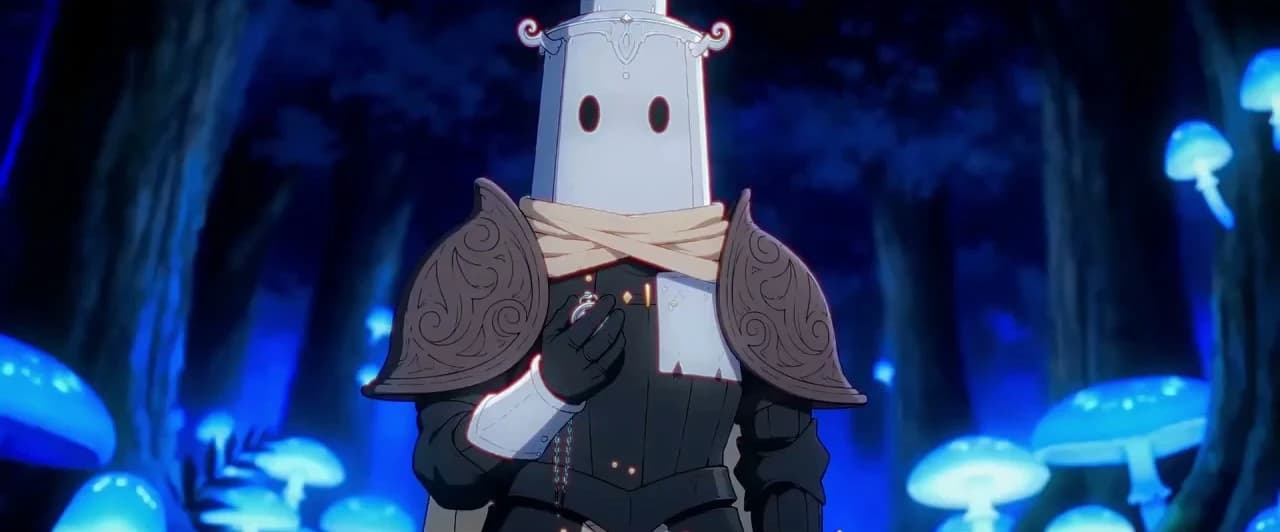
Frame from episode 1 of Lost Garden (3 min 18 s). Same knight, same blue light, across two episodes.
The site's process page sums up the method. The script is written by hand in ScreenWeaver, the storyboard is generated scene by scene from the script, and the shots are animated from reference images with Seedance 2 and other video models. No single model made the episode.
For your own project, start with the line from the site: direction, references and selection matter more than the tool's name. Then be careful with face close-ups. A full-frame machine eye leaves you room, a talking face leaves you very little. And don't confuse machine time with working time: the 63 hours on episode 1 cover writing, storyboard, generation, sorting and editing.
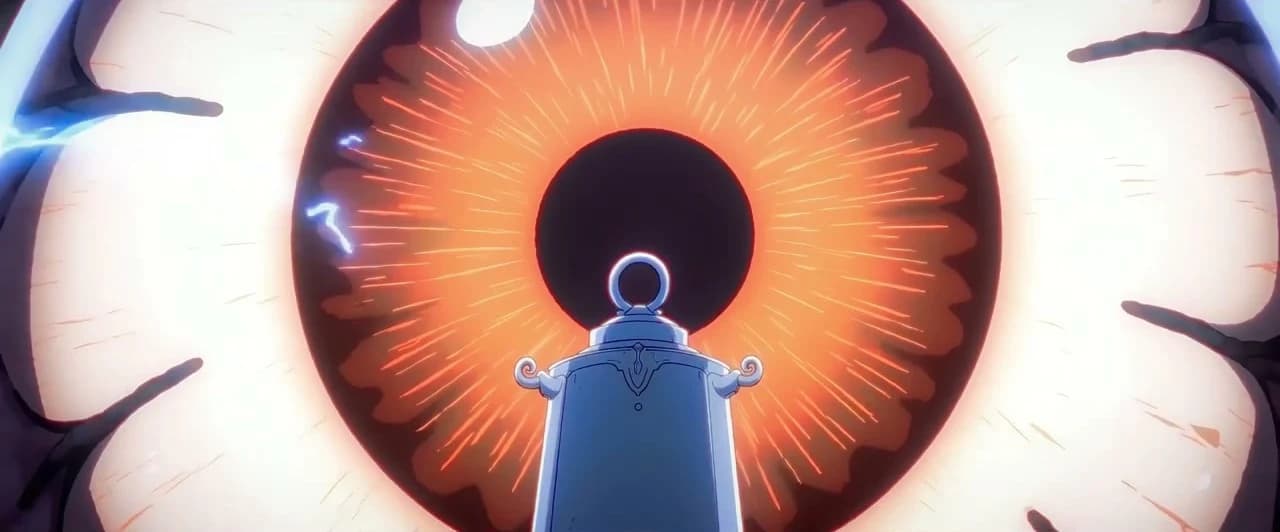
Episode 1 of Lost Garden (4 min 12 s): the knight facing a giant machine's eye.
If you want to see where the money and hours go on this kind of project, I broke down how much an AI short film costs in 2026, line by line.
Why other rankings tell a different story
If you searched for the best AI anime generator, you probably landed on rankings published by the tools themselves. PixVerse's, dated September 20, 2026, puts PixVerse first.
Nothing wrong with that. Still, look at the models listed: Runway Gen-3 Alpha and Pika 2.1 are old versions, and neither Seedance nor Vidu is there. Dreamina publishes its own lists too, and they lead to Dreamina. Read them as sales pages, and always check who published the ranking.
PixVerse is still an option: its V6 and C1 models are front and center on its site. I didn't rank it for lack of an independent source and of pricing I could read without an account.
Which tool for which project
| Project | Main tool | On the side |
|---|---|---|
| Series with recurring characters | Seedance 2.5 | niji for the character sheet, ElevenLabs for voices |
| Action short on a tight budget | Vidu Q4 | Kling Motion Control for fights |
| Anime-style music video | Vidu Q4 or Seedance 2.5 | Vidu's Video to Anime to test the look |
| Adapting a webtoon or manga | A pipeline tied to the script | Seedance 2.5 to animate the panels |
| First tries without paying | Vidu free plan (limited credits) | niji to draw |
On long projects, the question stops being the model and becomes organization: who keeps the script, the shots, the references and the versions in one place. That's why I built ScreenWeaver, which links script, storyboard and production, with Seedance 2.5 as the default and Kling 3.0 Motion Control among the models. It can also import webtoon pages and turn them into anime shots. My wider ranking of AI filmmaking software compares this kind of tool, flaws included.
Sources checked on 10/26/2026: ByteDance Seed's Seedance 2.5 page, Dreamina's Seedance 2.5 and pricing page, Vidu's Q4, pricing and Video to Anime pages, Kling's Motion Control page, Midjourney's parameter docs and the niji homepage, Kling's and Vidu's Trustpilot profiles, PixVerse's published anime ranking, Lost Garden's process page. Seedance 2.5 API details (50 references, 1080p, audio languages) come from the BytePlus docs reread on 10/25/2026.
- Tested for this article: nothing. No generation was run.
- First-hand: the production of Lost Garden (ScreenWeaver, Seedance 2 and other models), with the published figures of 63 hours for episode 1 and 75 hours for episode 2.
- Not verified: Kling's pricing grid (not shown without an account), Niji's compatibility with Midjourney V8.1.
- Conflict of interest: I co-founded ScreenWeaver. The ElevenLabs link is an affiliate link.
Frequently asked questions
Quick answers to the questions readers ask most about this article.
What is the best AI to make an anime in 2026?
To animate the shots of a series, Seedance 2.5 is my first pick. It accepts 50 references per generation and produces up to 30 seconds at once, which helps keep the same character from shot to shot. Vidu Q4 is the best alternative if your style is very 2D or your budget is tight, at about $0.02 a second at 540p on the Standard plan. Kling copies a filmed movement with Motion Control, and niji draws the characters before you animate them. No tool makes a full episode alone: you combine image, video, voice and editing.
Is there a free AI to make an anime?
There are free plans, but none of them is enough for an episode. Vidu has a free plan that burns 4 credits per second at 540p with Q4, twice the paid rate, and caps references at 10 a month. Dreamina shows a button to start for free, and its Basic plan cost €0.27 for the first month on October 26, 2026, before going to €13.99. That's enough to learn and test a style. To produce several minutes, plan a budget, and always read the price after the promo.
How do you keep the same character in an AI anime?
Build a sheet before you generate anything: front, profile, back, expressions, costume, palette. Then give those images as references for every shot. Seedance 2.5 takes up to 30 of them, Vidu Q4 up to 15. Also describe the character with the same words in every prompt. When a shot drifts, check that no reference is missing before you blame the model. Avoid face close-ups until the sheet is solid, that's where the gaps show the most.
Can AI turn filmed footage into anime?
Yes. Vidu has a Video to Anime tool that takes a 1 to 8 second filmed clip and turns it into an anime version, guided by a reference image and a prompt. Kling Motion Control works the other way: it takes the movement from your video and applies it to your character's image, and its page says it works on anime characters. Two limits to know: one main subject on Kling, and no sound. For a dialogue scene, you'll add the voices in the edit.
How long does it take to make an AI anime episode?
On Lost Garden, episode 1 (17 minutes) took me 63 hours and episode 2 (21 minutes) took 75 hours, with $1,852 of generation. Those are my published numbers, for all the work on an episode: writing, storyboard, generation, sorting and editing. Your time will depend mostly on your prep and on how many takes you're willing to throw away. A first short of two or three minutes is a better starting point than a full episode.
Can I use an AI-made anime commercially?
On Vidu, yes: its pricing page says generated content can be used commercially on paid plans. For the others, read your subscription terms before you publish or sell. Watch the style too: closely imitating an existing studio or series is a rights problem whatever the tool. Seedance itself drew legal threats from US studios in 2026 over this. Build your own world, it's safer and more interesting.
Which tool to adapt a manga or webtoon into an anime?
You need a tool that keeps the layout. Manga panels are already a storyboard: the job is turning them into shots, with the same characters, then animating them. ScreenWeaver, which I co-founded, imports comic, manga or webtoon pages, splits the panels and prepares the shots to animate with Seedance 2.5. You can also do it by hand: each panel becomes a reference image, you animate panel by panel in Vidu or Seedance, then you edit.
Related articles
 Comparatifs
Best AI Filmmaking Software in 2026: My Ranking
Six AI filmmaking tools ranked by how much of a film they actually hold, from script to edit. Prices checked on October 22, 2026.
 Actualité
Leonardo AI: The Best Free Alternative to Generate Images?
A complete test of Leonardo AI to find out whether it can really replace paid tools, with a realistic workflow and concrete limits.
 Comparatifs
The Best Alternatives to Midjourney in 2026
A field comparison of the best Midjourney alternatives in 2026: Recraft, Ideogram AI, Leonardo AI, Bing Image Creator, Firefly, Craiyon and Nano Banana.